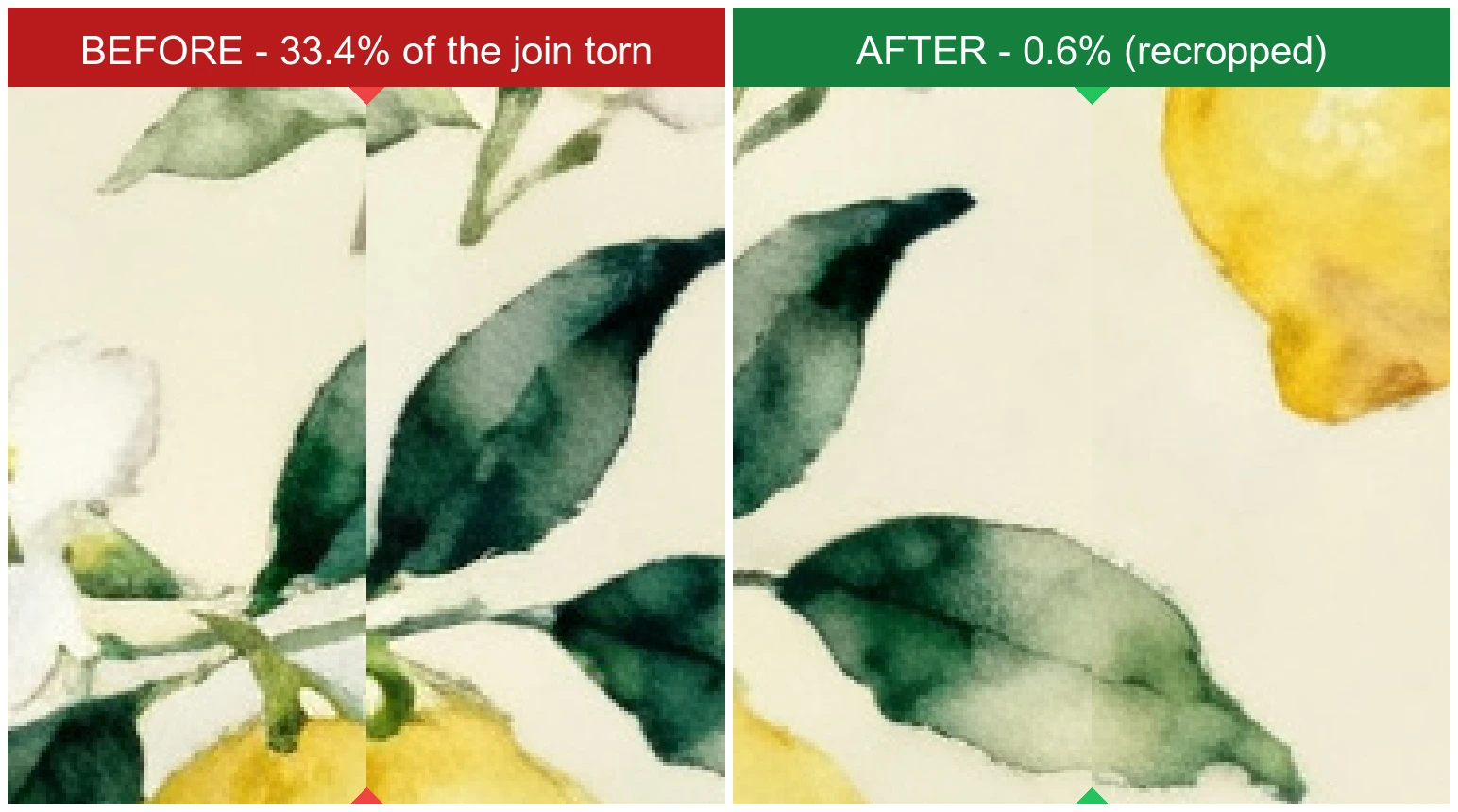
Look Right Down the Join
This is the seam itself, magnified — the edge where a tile wraps around onto its opposite side. Before, a third of that join is visibly torn: leaves and lemons run off one side with nothing to meet them on the other. But the motifs were laid out on a real grid, so the repeat was still in there. We found it and cut on it: the join now reads as unbroken artwork, and not one pixel of the design was redrawn.
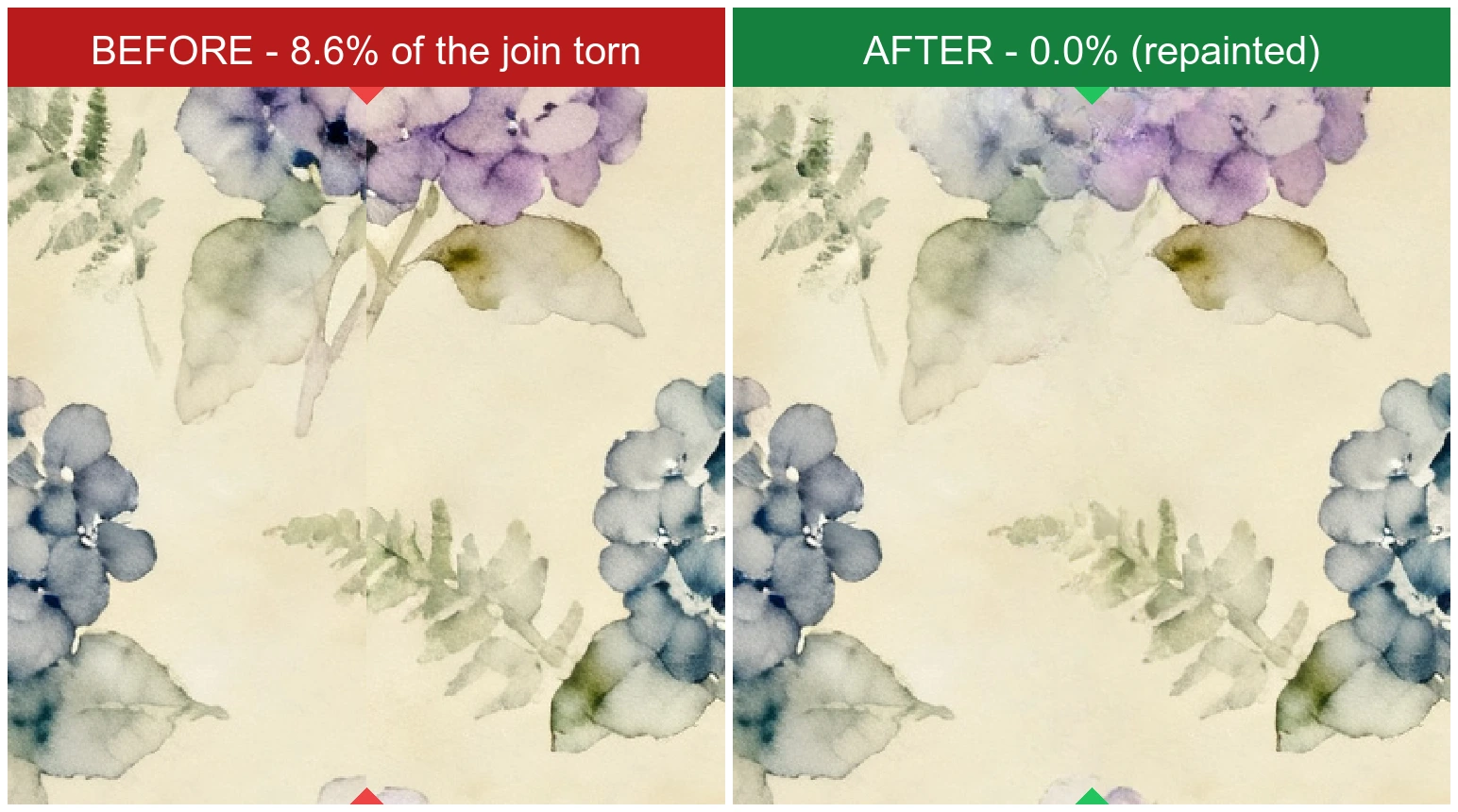
Repainted When the Repeat Is Gone
The same stretch of the same join, before and after. This pattern has no repeat hidden anywhere — there was nothing to cut on — so the seam is painted out instead: the torn blooms and ferns are rebuilt from the artwork surrounding them until the join simply disappears. Everything outside a narrow corridor is left exactly as it was, and the tile's own edges are never written to at all.
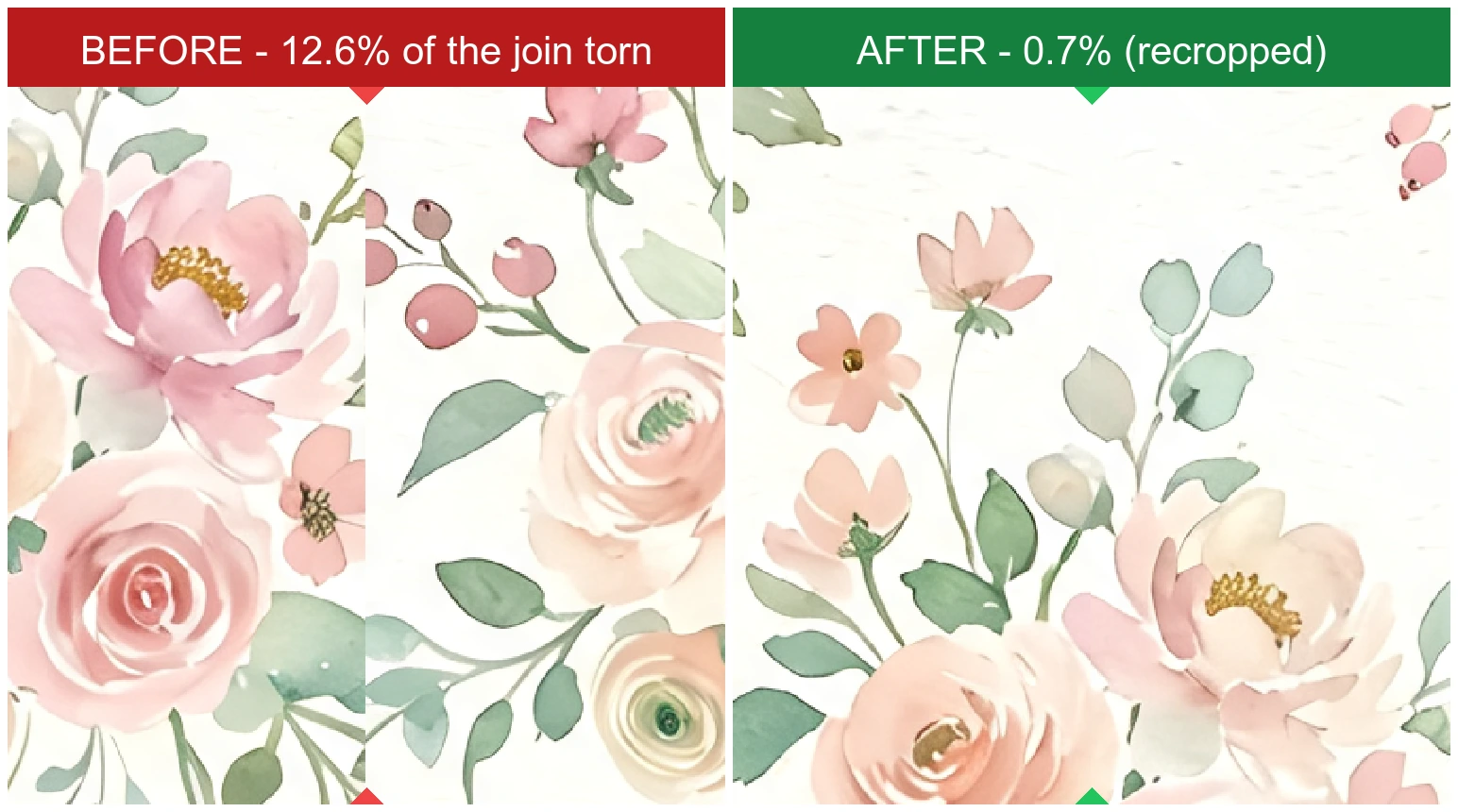
Cutting on the Repeat Costs You Nothing
A 2048px watercolour whose join was torn along an eighth of its length. Here the recovered period ran most of the way across the artwork, so what comes back is still 1589 by 1052 — a large tile, and every pixel of it the one that was uploaded. Recovering a repeat spends framing, never the design: the only thing thrown away is the off-period margin that was breaking it.
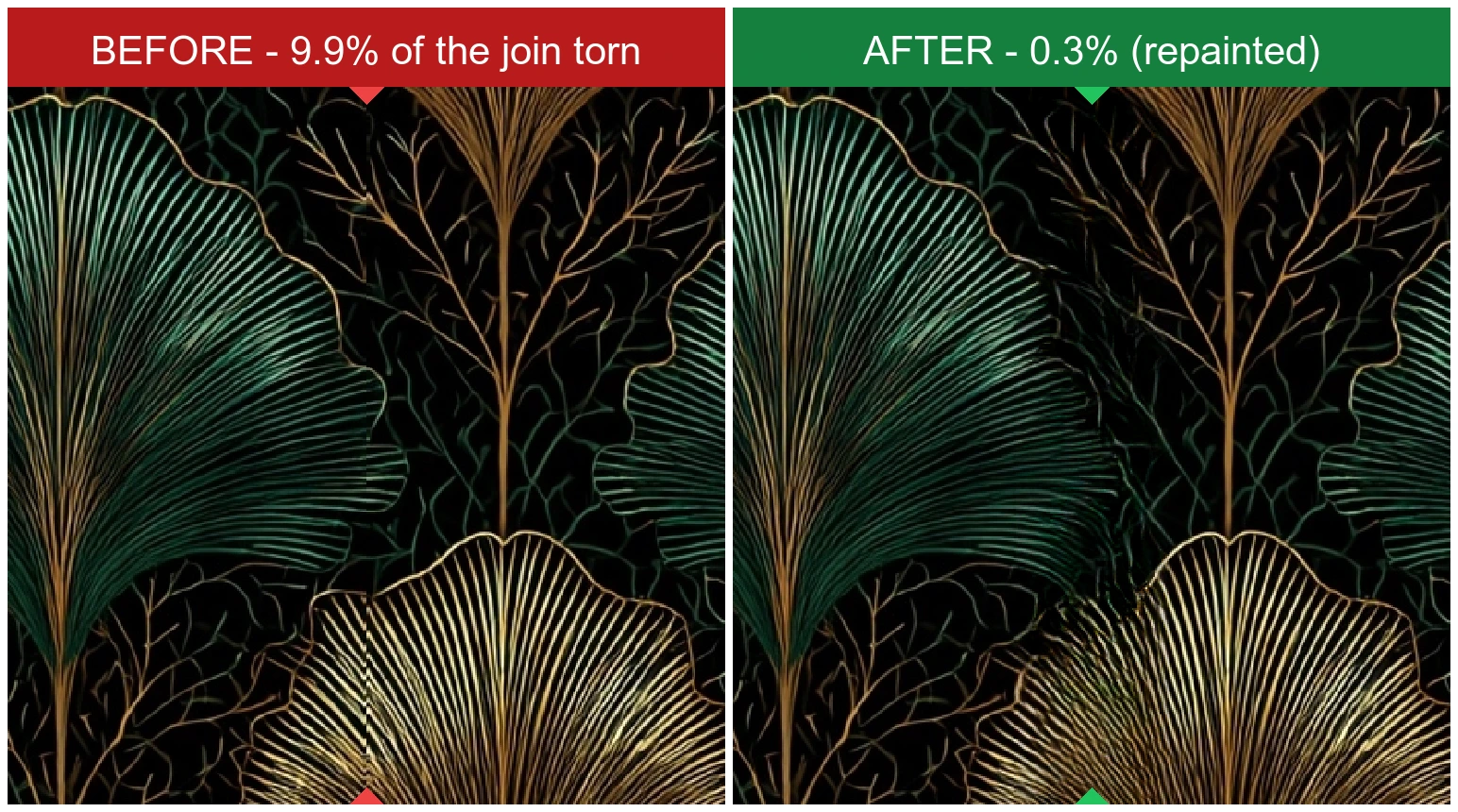
Not Only Soft Watercolour
Dark, high-contrast, hard-edged art deco — the kind of artwork an inpainter is meant to struggle with, since it reconstructs texture rather than geometry. The gold fans and fine linework close across the join anyway. The limitation is real, and a thick solid shape sliced in half is still its worst case, but it is a narrower one than 'anything bold fails'.
Explore More AI Tools
Frequently Asked Questions
What does the seamless pattern fixer do?
It takes a pattern that almost tiles and makes it actually tile. The usual cause is a crop: the artwork was designed to repeat, but it was cut at the wrong place, so motifs run off one edge without picking up where they should on the opposite one. The fixer repaints that break and hands back a tile that repeats cleanly.
How much does it cost?
Two credits per fix. That is the price whichever way your pattern gets fixed: most patterns that land here were cut out of artwork that genuinely repeated, so we recover the repeat by cropping, and only when the repeat is truly gone do we repaint the seam. You are told which one happened. You will need to be signed in.
Why try cropping before repainting?
Because it is the better fix whenever it is available. A pattern that 'should be seamless but isn't' was, nearly always, cut out of something that did repeat — that is the whole story behind the defect. If the repeat is still in there, the honest thing is to cut on it, which runs instantly and leaves every pixel of your artwork alone. Repainting invents pixels; it can only ever be second best. So we look for the repeat first and only reach for the model when there isn't one.
Why is my result smaller than the file I uploaded?
Because we found your pattern's real repeat and cut on it, and the repeat was smaller than the image. Nothing was lost: the tile we hand back contains the whole design and repeats it exactly, which is what a tile is for. We keep the largest crop that tiles cleanly rather than the smallest one — the tightest crop usually scores best but throws away most of the artwork and makes the repeat look obviously repetitive.
Why not just blend or fade the edges together?
Because opposite edges of an off-phase pattern hold unrelated artwork — half of one flower on the left, half of a different one on the right. Fading them into each other does force the edges to match, but it matches them by averaging two things that were never meant to meet, which reads as ghosting: soft, symmetrical smears along the seam. It trades a sharp defect for a blurry one.
How does the repaint actually work?
The tile is shifted by half its width and height, which brings the seam into the middle of the image without changing the pattern at all — a shifted tile lays out as the same wallpaper. The break is then repainted where it sits, in the open, with the artwork around it as context. Because the repair happens in the tile's interior, the edges themselves are never written to, so the repeat stays intact by construction rather than by hoping the model behaved. A second pass shifts again to reach the last stretch of the seam, and then everything is shifted back to the framing you uploaded.
What if my pattern is already seamless?
We check before doing anything, and if it already tiles we hand it straight back untouched and charge you nothing. Repainting a pattern that was fine would rewrite a corridor of artwork for no reason, so it is worth the half-second it takes to look first.
Will my pattern still look like my pattern?
Yes, apart from a narrow corridor along where the seam used to be. Everything outside that corridor is your original artwork, pixel for pixel. Inside it, motifs that were torn by the crop are repainted — usually resolved back into the background rather than reconstructed, so a busy area may end up slightly less dense. It is a repair, not a redraw.
What kinds of pattern does this work well on?
Painterly and organic artwork — watercolour florals, foliage, scattered motifs, marble and other continuous textures. The repair reconstructs texture, so patterns whose seam falls across soft or busy detail come back cleanly. It is much weaker on bold flat-vector work: given a thick geometric shape cut in half, it cannot redraw the shape, and will either blur it or leave part of the seam behind. If your pattern is built from large solid shapes, expect a visible repair — you are usually better off redrawing the tile or generating one that is seamless from the start.
What image formats and sizes can I upload?
JPG and PNG, up to 8MB. Patterns larger than 1024px on their longest edge are scaled to fit that bound before the repair, which keeps the job inside what the model handles reliably.
How do I confirm the result is really seamless?
Tile it. The tool will lay out both your original and your result full-screen, exactly the way a printer or a CSS background would, so you can compare the same pattern before and after and look along the joins. You can also drop the downloaded file into our free Seamless Pattern Checker.